Understanding EC2 Instance States
Gain a solid understanding of EC2 instance states and learn how to manage and troubleshoot your instances effectively.

I am a DevOps Engineer interested in gaining and sharing knowledge. Most interested in automation. Writing about DevOps tools and AWS.
Introduction
In this blog article, we'll deep dive into Amazon Web Services (AWS) EC2 instance states. EC2 instances are virtual servers in the cloud that perform tasks including hosting and running applications. To effectively manage instances, it is essential you know the various states an instance can have. Without further talk, lets' get into it!
Understanding EC2 Instance States
Before we delve in, you could check out the "Instance Lifecycle" (by clicking the image below) in the AWS documentation to understand how an EC2 Instance transitions through different states from the moment you launch through to its termination.
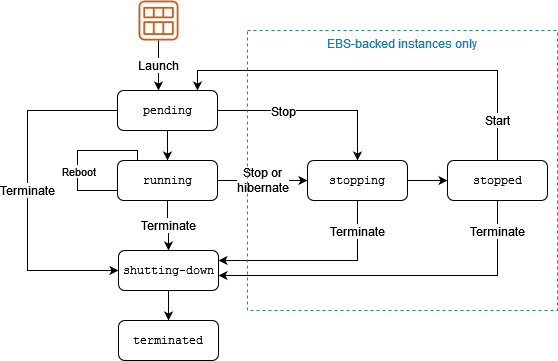
On to the business of the day, the instance states are as follows:
Pending: This is the starting point for all EC2 instances, which is when the instance is being created. AWS is provisioning the resources requested, so the instance can run as required.
Running: When your instance is "Running", the instance/ virtual server is ready to perform tasks. Depending on your instance configuration, your instance is actively performing the desired tasks whether it is hosting a website etc.
Stopped: When your instance is "Stopped", it can be related to pausing a video. Your instance is not deleted but paused temporarily. You won't incur charges while your instance is stopped, but you will not be able to access your server.
Terminated: When your instance is "Terminated", it is really a "goodbye". AWS releases all resources associated with the instance and the instance can be recovered anymore. So, be careful before hitting this button.
Shutting Down: When your instance is "Shutting Down", it's just before your instance stops or terminates. Once it's done shutting down, you can either stop or terminate it.
Rebooting: When your instance is "Rebooting", your instance is literally rebooting. Interesting use cases would be applying updates, or troubleshooting minor issues. Rebooting returns an instance to a "Running" state.
Initializing: When your instance is "Initializing", your instance is setting up and configuring itself to run your specified applications. This state is encountered less often, especially when using custom Amazon Machine Images (AMIs) to launch instances. your instance sets up and configures itself to run your specific applications.
Error: When your instance is "Error", it is pretty obvious that something went wrong. Could be as a result of misconfigurations, hardware issues etc. Check your configuration, you might need change a few things.
Summary
Pending: The instance is being created and AWS is provisioning the requested resources.
Running: The instance is running i.e AWS has provisioned the resources.
Stopping: The instance is in the process stopped, but everything related to it still persists. The instance can be restarted.
Stopped: The instance has been stopped, but everything related to it still persists. The instance can still be restarted.
Terminated: The instance has been successfully and permanently deleted and cannot be restarted.
Shutting Down: The instance is being stopped.
Rebooting: The instance being restarted
Initializing: The instance is configuring itself during launch, often with custom settings.
Error: The instance has encountered an issue or failed to launch correctly.
Conclusion
It is essential to understand EC2 instance states to easily manage and troubleshoot your cloud infrastructure. In this article, we learnt about EC2 instance states, both good and bad. Now, you can easily manage instances, resolve issues, and ensure seamless operations with your cloud environment.